I have been trying to export tiles or images so that I can use qgis to annotate my maps. And I cannot get it to work.
I get files produced .mbtiles but mbtilesviewer can't see anything in them and neither can qgis.
exporting images is easy - just stitch and I get an image but in qgis it might be upside down or whatever.... and there's no question of preserving layers ...
can anyone advise me on this?
main thing: just to put an annotation layer on my maps. any way I can.
second thing: knowing perhaps how to do it all via qgis if suitable.
How To Export for use by qgis ?
Модератор: Tolik
-
mate
- Новичок
- Сообщения: 48
- Зарегистрирован: 14 июн 2018, 11:52
- Благодарил (а): 1 раз
- Поблагодарили: 19 раз
Re: How To Export for use by qgis ?
I do not have any problems with QGIS 3.34 and the MBTiles or GeoTiff + worldfile (.w) that are exported from SAS (mostly using nightly builds).
-
abrogard

- Соображающий
- Сообщения: 75
- Зарегистрирован: 09 май 2018, 09:28
- Откуда: South Australia
- Благодарил (а): 5 раз
- Поблагодарили: 1 раз
- Контактная информация:
Re: How To Export for use by qgis ?
Thanks for that.
I was out of date so I updated. But I still can't get anywhere. Qgis I mean.
My sasplanet is 230909 10403 - that's the latest I think?
So I'm all up to date. But I still can't do it. I today exported a mbtiles things at 764 kB so that looks okay in file explorer.
But mbview makes nothing of it and qgis makes a file of it which has three bands. I get no picture. I get chatgpt to advise me and do things to try merge these colour bands and whatever. nothing I do works.
So I suspect the exported mbtiles is no good. You could see if you can make a view of it if you like: https://www.dropbox.com/scl/fi/dr4g7kjo ... 4esbw&dl=0
got me beat so far. I'll keep trying. I"m thinking I'll use a different map and no overlays...
No worries ! All okay. More or less.
I now use 'Stitch' instead of 'Export' and it works with settings: Geotiff and create georeferencing. So that's great. I'd like to know what's wrong with export mbtiles but I can live without it.
Now to learn how to use the annotate feature of Qgis.
I was out of date so I updated. But I still can't get anywhere. Qgis I mean.
My sasplanet is 230909 10403 - that's the latest I think?
So I'm all up to date. But I still can't do it. I today exported a mbtiles things at 764 kB so that looks okay in file explorer.
But mbview makes nothing of it and qgis makes a file of it which has three bands. I get no picture. I get chatgpt to advise me and do things to try merge these colour bands and whatever. nothing I do works.
So I suspect the exported mbtiles is no good. You could see if you can make a view of it if you like: https://www.dropbox.com/scl/fi/dr4g7kjo ... 4esbw&dl=0
got me beat so far. I'll keep trying. I"m thinking I'll use a different map and no overlays...
No worries ! All okay. More or less.
I now use 'Stitch' instead of 'Export' and it works with settings: Geotiff and create georeferencing. So that's great. I'd like to know what's wrong with export mbtiles but I can live without it.
Now to learn how to use the annotate feature of Qgis.
-
mate
- Новичок
- Сообщения: 48
- Зарегистрирован: 14 июн 2018, 11:52
- Благодарил (а): 1 раз
- Поблагодарили: 19 раз
Re: How To Export for use by qgis ?
Just uncheck the "Use xyz schema" box in the mbtiles export options.
-
abrogard
- Соображающий
- Сообщения: 75
- Зарегистрирован: 09 май 2018, 09:28
- Откуда: South Australia
- Благодарил (а): 5 раз
- Поблагодарили: 1 раз
- Контактная информация:
Re: How To Export for use by qgis ?
thanks, mate, I'll do that.mate писал(а):Just uncheck the "Use xyz schema" box in the mbtiles export options.
slowly slowly I begin to get there. I seem to be, apart from yourself, the only english speaker using sasplanet. at least the only one who ever needs any help. such a big world. so many mappers. such a brilliant programme. but no one uses it?
-
abrogard
- Соображающий
- Сообщения: 75
- Зарегистрирован: 09 май 2018, 09:28
- Откуда: South Australia
- Благодарил (а): 5 раз
- Поблагодарили: 1 раз
- Контактная информация:
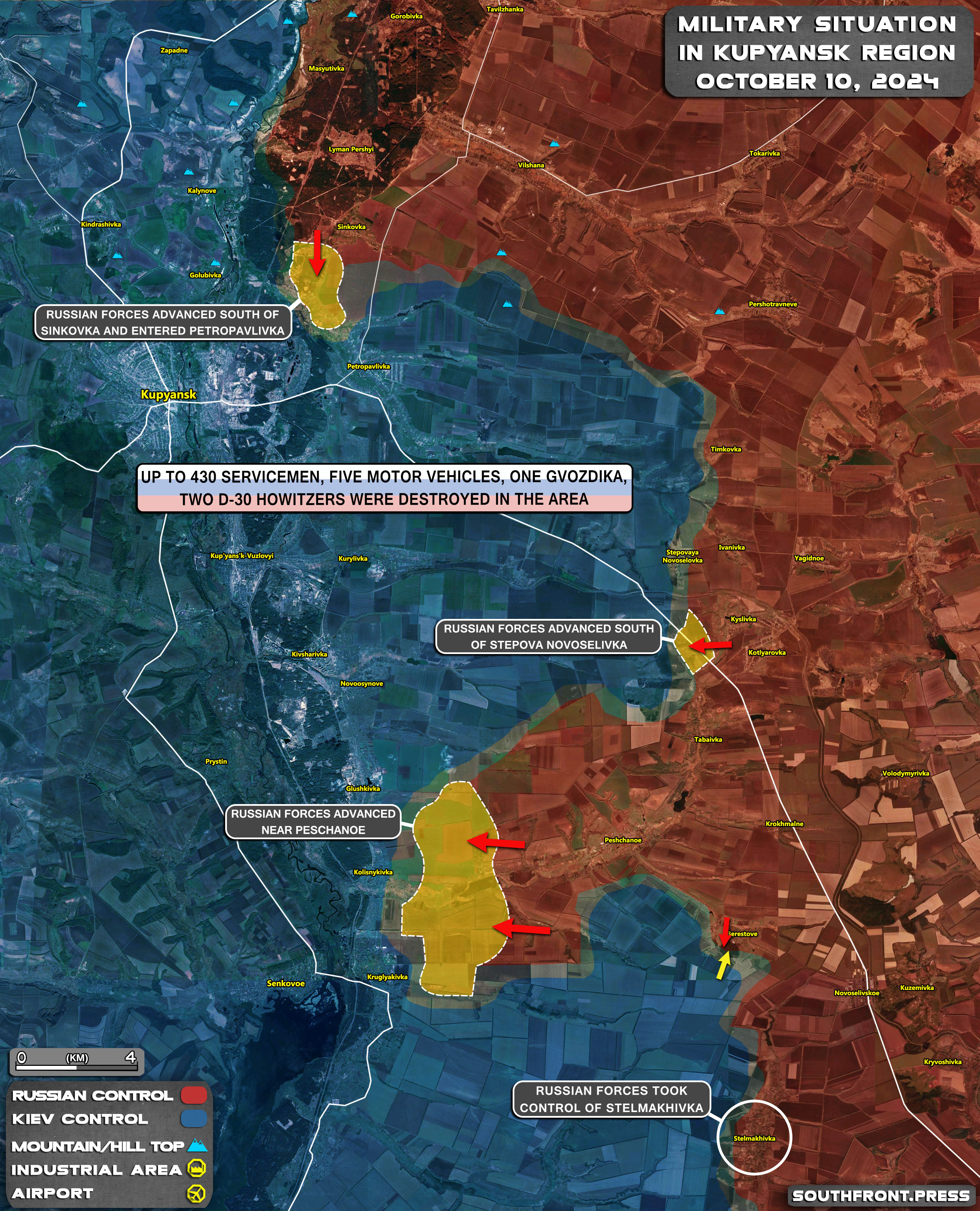
How to match Southfron maps?
Southfront maps seem to have more places on them than anything I can get.
I've tried every mixture of maps/layers that I can think of but I can't match what southfront produces.
Anyone got any idea of how I could get a similar display?
Here is an example of their maps: https://s5.cdnstatic.space/wp-content/u ... sk_map.jpg
I've tried every mixture of maps/layers that I can think of but I can't match what southfront produces.
Anyone got any idea of how I could get a similar display?
Here is an example of their maps: https://s5.cdnstatic.space/wp-content/u ... sk_map.jpg